
# Settings

Settings for Kobi Toolkit for Revit.

There are several settings of the program.
Language: You can change language settings.
General: Under the General section you have the option to choose whether you want the program to check for new versions. There is also an option to check if you do not want to show the »Attach Floors to Walls« dialog during your work.
Mark Options: For Alphabetic Sequence, you can define the alphabet that you want to use in your work and click on the Reset button.
Swing Calculation: You can define if you would like to Calculate the swing direction for Windows, and make a report of the swing placement side.
BIM Query: Setting for BIM Query tool, where you can define if you would like to report the room or space for each instance, Yes/No parameters, Phase, View template, and scope box and numbers as text. You can also check if you want to show parent family name or include revision schedules.
To Upper Case Exceptions: With
 you can add exceptions to upper case, with
  you can remove exceptions and with
  you can revert changes.
Update Shared Parameter Values: It is possible to choose when you would like to update parameter values – when you save or when you synchronize with central.
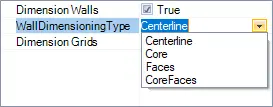
Dimensioning: For Walls and Grids you can define True or False for dimensioning. In Wall dimensioning time you can choose between – centerline, core, faces, or core faces.
QA/QC: Define the amount of toggle transpareny for Toggle transpareny tool.
Click on the Kobi Toolkit tab > Go to the Kobi Toolkit panel > Click on Settings > Choose the settings that you want to change and press the OK button