
# Label Elevation
Command Description
The "Label Elevation" command allows you to add elevation label to a selected point in drawing according to specified base elevation.
To label elevation of selected point
- Click Kobi Toolkit for AutoCAD tab > Annotation > Label Elevation
 .
. - Pick base point in the drawing and define base elevation.
- Pick point to add elevation label.
- In the command line are three another options:
"Base" to change base elevation
"Settings" to set next parameters:
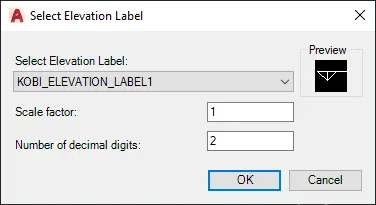
- Select Elevation Label from drop-down menu
- Scale factor: enter label elevation scale factor
- Number of decimal digits: enter the number of decimal digits
"Exit" to end the command.
Please note that elevation labels are dynamically updated whenever labels are moved or copied.