
# Renumber

A set of tools for manually or automatically renumbering elements in the model. It includes tools to renumber Rooms, Spaces, and Areas, update mark parameters for instances (Doors, Windows, Furniture, etc.), and renumber grids  or views on sheets based on defined settings.
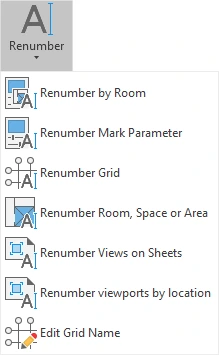
- Renumber by Room

Renumbers instances in an active view or whole project according to the room it belongs to. Works on Doors, Furniture, Furniture Systems, Lighting Fixtures, Speciality Equipment and Windows.
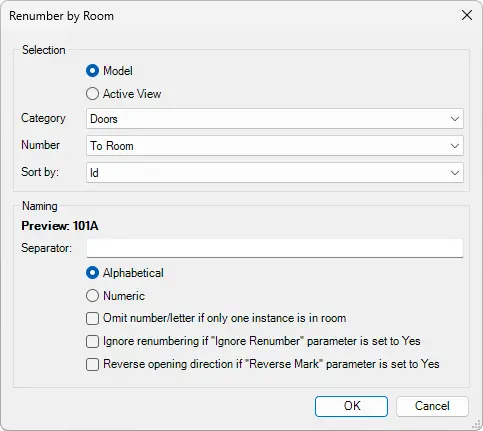
Selection
Select between Model (rename elements from the model) and Active View (rename elements from active view)
- Category - Select which elements you want to rename.
- Number - Define renumbering To Room or From Room.
- Sort by - Sort by Id or X, Y, Z Location, or Y, X, Z Location.
Naming
- Preview - Shows the preview of the element renumbering.
- Separator - Define a text separator between the Room number and element number.
Click on the Kobi Toolkit tab > Go to the Annotate panel > Click on Renumber > In the drop-down menu, select Renumber by Room > Set up options of renumbering in the dialog window > Click OK
Renumber Mark Parameter

Displays a dialog box, where you can specify the renumbering settings. Click on the instances in the order you want them to be renumbered. This tool updates the Mark parameter for the selected instance.

- Preview - Shows the preview of the element renumbering.
- Prefix - Adds a mark, letter, or space before the Index.
- Suffix - Adds a mark, letter, or space after the Index.
- Format - Define a format (0, 00, 000…) and see how it looks in the preview.
- Initial Index - If the user adds a number or letter, this will be the start letter or number for renumbering.
- Increment - Enlarges the number by the factor that is inserted.
Click on the Kobi Toolkit tab > go to Annotate panel > Click on Renumber > In drop-down menu, select Renumber Mark Parameters > Set up options of renumbering in dialog window > Click Mark > in active view click on the instances in the order they are to be renumbered.
Renumber Grid

Displays a dialog box of the renumbering settings. Click on the grids in the order they are to be renumbered. This tool updates the Name parameter for the selected grid.
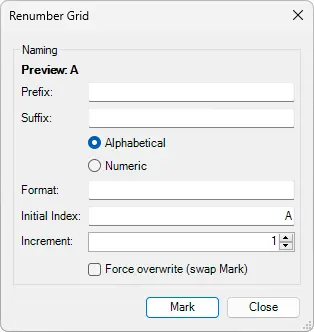
- Preview - Shows the preview of the element renumbering.
- Prefix - Adds a mark, letter, or space before the Index.
- Suffix - Adds a mark, letter, or space after the Index.
- Format - Define a format (0, 00, 000…) and see how it looks in the preview.
- Initial Index - If the user adds a number or letter, this will be the start letter or number for renumbering.
- Increment - Enlarges the number by the factor that is inserted.
Click on the Kobi Toolkit tab > Go to the Annotate panel > Click on Renumber > In the drop-down menu, select Renumber Grid > Set up options of renumbering in the dialog window > Click Mark > In active view click on the grids in the order they are to be renumbered
Renumber Room, Space or Area

Displays a dialog box of the renumbering settings. Click on a room, space, or area in the order they are to be renumbered. This tool updates the Name parameter for the selected grid.
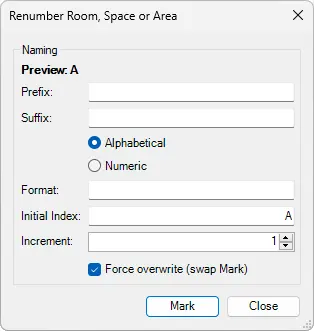
- Preview - Shows the preview of the element renumbering.
- Prefix - Adds a mark, letter, or space before the Index.
- Suffix - Adds a mark, letter, or space after the Index.
- Format - Define a format (0, 00, 000…) and see how it looks in the preview.
- Initial Index - If the user adds a number or letter, this will be the start letter or number for renumbering.
- Increment - Enlarges the number by the factor that is inserted.
Click on the Kobi Toolkit tab > Go to the Annotate panel > Click on Renumber > In the drop-down menu, select Renumber Room, Space or Area > Set up options of renumbering in the dialog window > Click Mark > In active view click on the grids in the order they are to be renumbered
Renumber Views on Sheets

Displays a dialog box of the renumbering settings. Click on a viewport in the order they are to be renumbered. This tool updates the Detail Number parameter for the selected viewport.

- Preview - Shows the preview of the element renumbering.
- Prefix - Adds a mark, letter, or space before the Index.
- Suffix - Adds a mark, letter, or space after the Index.
- Format - Define a format (0, 00, 000…) and see how it looks in the preview.
- Initial Index - If the user adds a number or letter, this will be the start letter or number for renumbering.
- Increment - Enlarges the number by the factor that is inserted.
Click on the Kobi Toolkit tab > Go to the Annotate panel > Click on Renumber > In the drop-down menu, select Renumber Views on Sheets, Space or Area > Set up options of renumbering in the dialog window > Click Mark > In active view click on the grids in the order they are to be renumbered
Renumber Viewports by location
Automatically renumbers viewports based on their position on the sheet. The numbering layout is controlled by defining the number of horizontal and vertical regions.
The sheet is divided into invisible grid using the specified number of rows and columns. Viewports are numbered starting from the bottom-left region (A1), continuing to the right (A2, A3, …) and then upwards (B1, C1, …). If multiple viewports fall within the same grid cell, they are numbered using a suffix (for example A1-1, A1-2, A1-3).
The position of each viewport is evaluated using its bottom-left corner.
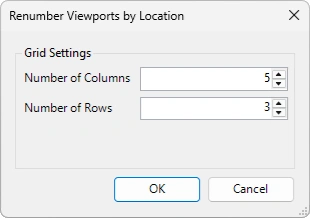
Grids Settings:
Number of Columns -Defines how many vertical regions the sheet is divided into for viewport numbering.
Number of Rows - Defines how many horizontal regions the sheet is divided into for viewport numbering.
An example of a sheet divided into 5 columns and 3 rows.

The red marker indicates the bottom-left corner of the viewport used to determine its position on the sheet.

Open sheet on which you want to renumber viewports > Go the Kobi Toolkit tab > Go to the Annotate panel > Click Renumber > From the drop-down menu, select Renumber Viewports by location > Define number of columns and rows > Click OK
- Edit Grid Name

Displays selected grids in a list. Names can be edited manually or automatically by assigning grid names in ascending or descending order. Prior to assigning grid names, grids can be sorted by any of the available parameters.

- Edit Grid Name - Selected Grids:
- Angle - Shows if a grid is under an angle.
- Grid Vertical - Shows if the grid is vertical.
- Grid Horizontal - Shows if the grid is horizontal.
- Grid Middle X - Show X coordinate in the middle of the grid line.
- Grid Middle Y - Show the Y coordinate in the middle of the grid line.
- Grid Name - Shows current grid name.
- New Grid Name - Input a new grid name which will replace the current grid name.
- Select
 or
or  to automatically assign grid names in ascending or descending order. In the new dialog box input the first grid name (letters or numbers) and select OK.
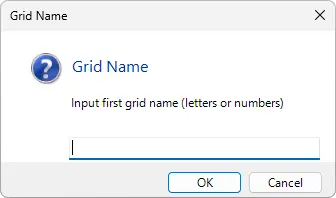
Select one or multiple Grids in the view > Click on the Kobi Toolkit tab > Go to the Annotate panel > Click on Renumber > In the drop-down menu, select Edit Grid Name > Set-up options in the dialog window > Click Apply & Close