
# Animation
Command Description
This command allows you to generate animations along the horizontal and vertical vehicle paths, customize animation speed, and position the vehicle stamp at any chosen station.
To create the animation
Click Kobi Swept Path > Create and Manage Analysis Panel > Animation
 .
.Select a Kobi swept path entity in a drawing.
The “Animation” dialog will appear.
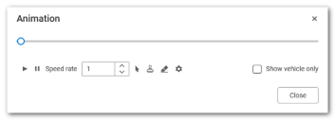
Click the
 button to start the animation and the
  button to stop the animation.
In the “Speed rate” field, specify the animation playback speed.
Click
 to pick the current vehicle position in the simulation.
Click the
 to place a vehicle stamp at the selected position.
Click
 to remove all placed stamps from the analysis.
Click
 to view information about the vehicle used in this analysis.
Tick the “Show vehicle only” checkbox to display only the vehicle stamp and hide all other elements from the horizontal or vertical analysis.