
# Navigator
Command Description
This command enables to manage all horizontal and vertical analysis in a centralized interface. Generate detailed reports, continue simulations, create animations, and zoom in on specific analyses for greater efficiency.
To use Simulation Navigator
Click Kobi Swept Path > Create and Manage Analysis Panel > Guided Drive
 .
.Simulation Navigator opens. In the dialog you have all existing swept path analysis from the drawing centralized. They are grouped in two groups: Horizontal and Vertical analysis.
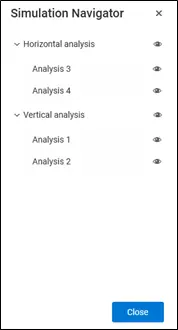
- You can run commands directly from this dialog. When selecting the swept path analysis in the dialog, you can access the commands with the right mouse button.

Zoom to simulation: zooms to the selected simulation in the drawing.
Select: Selects the simulation in the drawing.
Hide: Hides the simulation.
Animation: Runs the animation of the vehicle swept path analyse.
Continue simulation: Continues the existing horizontal swept path analysis.
Create graph: Generates a wheel steering angle graph of the swept path analysis.
Zoom to graph: Zooms to the graph corresponding to the selected analysis.
Rename: Allows the user to assign a new name to the existing swept path analysis.
Delete: Permanently removes the selected swept path analysis from the drawing.