# Edit New Vehicle
To Edit a new vehicle
Right click on a new vehicle in the Vehicle library and select the option Edit.
In Vehicle Information dialog, define Vehicle name and library.
With Edit button on the right, edit Motor vehicle parameters.

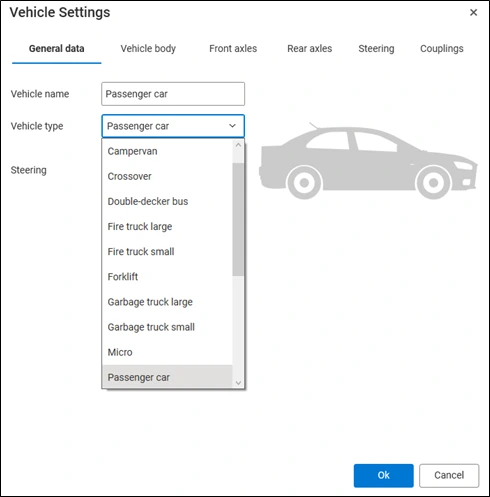
- In Vehicle Settings dialog, under General data tab, define Vehicle name, Vehicle type and Steering. Various types of vehicles are available for selection, as illustrated in the image below.
- Under Vehicle body tab, define Vehicle parameters such as:
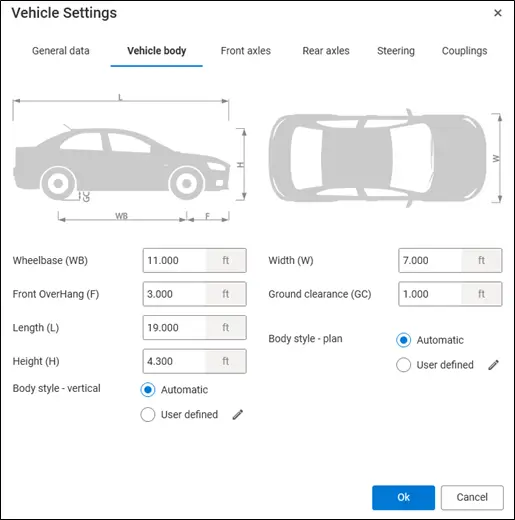
Wheelbase (WB): The distance between the centers of the front and rear axles of a vehicle.
Front Overhang (F): The distance from the front bumper to the center of the front axle.
Length (L): The total length of the vehicle, measured from the frontmost points to the rearmost point.
Height (H): The vertical distance from the ground to the highest point of the vehicle.
Ground Clearance (GC): The distance between the lowest point of the vehicle's underside (excluding the wheels) and the ground.
Width (W): The maximum distance between the outermost points on either side of the vehicle, excluding mirrors.
Vehicle images have been included to make the interpretation of parameters clearer and more intuitive.
- Body style – vertical and Body style – plan can be defined as:
Automatic: vehicle contour is created automatically based on inserted parameters. Shape is rectangular.
User defined: two options are available – 1. An existing template may be selected from the drawing, 2. Vehicle body points can be manually specified within the drawing.
- Define Front axles parameters under Front axles tab.
Wheels for each axle side: define the number of wheels on each axle side.
Wheel track: the distance between the left and right wheel (outer points).
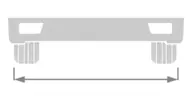
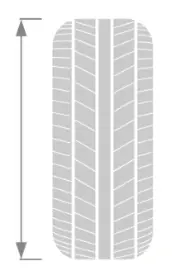
- Tire diameter: the overall outside diameter of the tire, measured from one outer edge to the opposite outer edge.
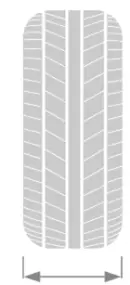
- Tire width: the width of the tire’s cross-section, measured from sidewall to sidewall.
- Offset from previous axle: the longitudinal distance between the current axle and the previous axle, measured along the vehicle's centerline. This option is locked in case of just one axle.

List of the axles is displayed on left side of the dialog. You can add an axle with the button “Copy”. To edit newly created axle parameters, click on the axle in the list and edit its parameters on the right side.
Axle type: turning or fixed. Turning axles are capable of steering, i.e. they pivot left or right to control the vehicle direction. Fixed axle is rigid and not capable of steering.

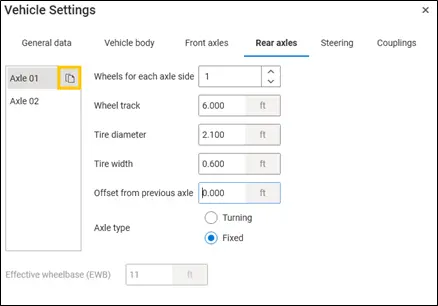
- Define Rear axles parameters under Rear axles tab.
Wheels for each axle side: define the number of wheels on each axle side.
Wheel track: the distance between the left and right wheel (outer points).
- Tire diameter: the overall outside diameter of the tire, measured from one outer edge to the opposite outer edge.
- Tire width: the width of the tire’s cross-section, measured from sidewall to sidewall.
- Offset from previous axle: the longitudinal distance between the current axle and the previous axle, measured along the vehicle's centerline. This option is locked in case of just one axle.
List of the axles is displayed on left side of the dialog. You can add an axle with the button “Copy”. To edit newly created axle parameters, click on the axle in the list and edit its parameters on the right side.
Axle type: turning or fixed. Turning axles are capable of steering, meaning the wheels can turn to assist with maneuvering. Fixed axles are non-steering and rigidly mounted—the wheels remain in a straight position.
Effective wheelbase (EWB): The effective wheelbase is the adjusted distance between the front axle and the rear turning axle, which reflects the vehicle's actual turning behavior rather than its physical wheelbase. This option is locked in case of fixed axle.
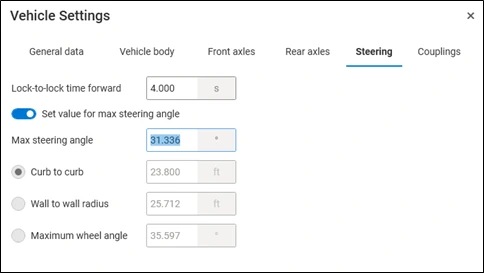
- Define Steering parameters under Steering tab.
Lock-to-lock time forward: The time it takes to turn the steering wheel from the full left lock to the full right lock (or vice versa), while the vehicle is moving forward.
Set value for max steering angle: If the switch is on, you can enter the value for maximum steering angle. Options Curb to curb, Wall to wall radius and Maximum wheel angle are disabled. If the switch is off, the value for maximum steering angle is disabled. You can enter the Curb to curb value, or Wall to wall radius value, or Maximum wheel angle value.
Max steering angle: The largest angle to which a wheel can be turned from straight-ahead position.

- Curb to curb: Current turning radius, measured from the center of the turning circle to the outer most tire.
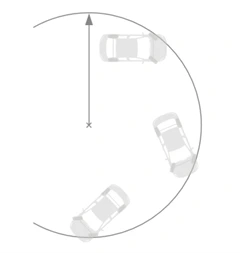
- Wall to wall radius: Current turning radius, measured from the center of the turning circle to the outermost point of the vehicle body.

- Maximum wheel angle represents the maximum angle to which a wheel can rotate around its steering axle.

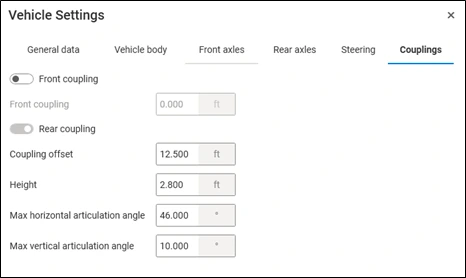
- Define Coupling parameters under Couplings tab.
- Front coupling: Coupling mechanism located at the front end of a trailer or motor vehicle, which allows it to be connected to a trailer. In case of a motor vehicle (i.e. first unit of the vehicle) it does not exist, so this option is disabled. In case of the second unit of the vehicle (for example a trailer), this option is enabled. When the switch is on, the program automatically defines the front coupling’s position in the way that the unit is attached correctly to the vehicle in front of it.

Rear coupling: Coupling mechanism located at the rear of a vehicle or trailer, designed to attach and tow an additional trailer or unit in a multi-vehicle configuration. When the switch is on, you can define coupling offset, height, max horizontal articulation angle and max vertical articulation angle. If the vehicle does not have rear coupling, turn the switch off. In this case, rear coupling parameters are disabled.
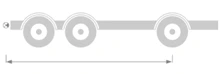
Coupling offset: it defines the position of the coupling. It is the distance measured between the rear coupling point and the front axle.
- Height: vertical distance from the ground to the center of the rear coupling point.

- Max horizontal articulation angle: the maximum angle allowed between the motor vehicle and the trailer at the rear coupling, measured in the horizontal plane.

- Max vertical articulation angle: the maximum angle allowed between the motor vehicle and the trailer at the rear coupling, measured in the vertical plane.