# Add New Trailer
To Add a new trailer
Click Kobi Swept Path > Create and Manage Analysis Panel > Vehicle Library
 .
.In Vehicle Library dialog, right click on the vehicle and select Edit. In Vehicle Information dialog, click on
 button to add a new trailer. Select the type of the trailer in Trailer Types dialog and press OK.
In Vehicle Information dialog, click on Edit button to open Vehicle Settings dialog.

- Under General data tab, define Vehicle name and select Vehicle type. You can choose between Basic trailer, Semi-trailer and Drawbar.

- Under Vehicle body tab, define trailer’s parameters. Depending on the type of trailer, different parameters may be available.
a. Basic trailer’s parameters:
Wheelbase (WB): The distance between the rear coupling of the motor vehicle and the axle of a trailer.
Cargo section length (CSL): Internal length of the trailer’s load-carrying area, measured from the front wall of the cargo space to the rear wall.
Length (L): The overall length of the trailer.
Height (H): Vertical distance from the ground to the highest point of the trailer.
Width (W): Horizontal distance measured from one side of the trailer to another one.
Ground clearance (GC): distance between the lowest point of the trailer (excluding the wheels) and the ground.

b. Drawbar’s parameters:
Wheelbase (WB): The distance between the rear coupling of the motor vehicle and the axle of a trailer.
Length (L): The overall length of the trailer.
Width (W): Horizontal distance measured from one side of the trailer to another one.
Ground clearance (GC): distance between the lowest point of the trailer (excluding the wheels) and the ground.

c. Semi-trailer’s parameters:
Wheelbase (WB): The distance between the rear coupling of the motor vehicle and the axle of a trailer.
Front Overhang (F): The distance from the front coupling to the center of the front axle.
Length (L): The overall length of the trailer.
Height (H): Vertical distance from the ground to the highest point of the trailer.
Width (W): Horizontal distance measured from one side of the trailer to another one.
Ground clearance (GC): distance between the lowest point of the trailer (excluding the wheels) and the ground.

- Define Rear axles parameters under Rear axles tab.
Wheels for each axle side: define the number of wheels on each axle side.
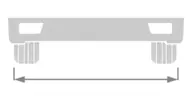
Wheel track: the distance between the left and right wheel (outer points).
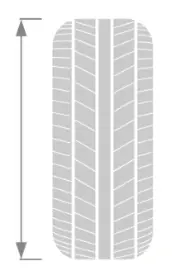
- Tire diameter: the overall outside diameter of the tire, measured from one outer edge to the opposite outer edge.
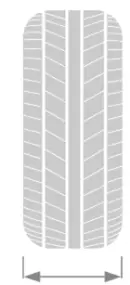
- Tire width: the width of the tire’s cross-section, measured from sidewall to sidewall.
- Offset from previous axle: the longitudinal distance between the current axle and the previous axle, measured along the vehicle's centerline. This option is locked in case of just one axle.

List of the axles is displayed on left side of the dialog. You can add an axle with the button “Copy”. To edit newly created axle parameters, click on the axle in the list and edit its parameters on the right side.
Axle type: turning or fixed. Turning axles are capable of steering, meaning the wheels can turn to assist with maneuvering. Fixed axles are non-steering and rigidly mounted—the wheels remain in a straight position.
Effective wheelbase (EWB): The effective wheelbase is the adjusted distance between the front axle and the rear turning axle, which reflects the vehicle's actual turning behavior rather than its physical wheelbase. This option is locked in case of fixed axle.

- Define Coupling parameters under Couplings tab.
- Front coupling: Coupling mechanism located at the front end of a trailer or motor vehicle, which allows it to be connected to a trailer. In case of a motor vehicle (i.e. first unit of the vehicle) it does not exist, so this option is disabled. In case of the second unit of the vehicle (for example a trailer), this option is enabled. When the switch is on, the program automatically defines the front coupling’s position in the way that the unit is attached correctly to the vehicle in front of it.

Rear coupling: Coupling mechanism located at the rear of a vehicle or trailer, designed to attach and tow an additional trailer or unit in a multi-vehicle configuration. When the switch is on, you can define coupling offset, height, max horizontal articulation angle and max vertical articulation angle. If the vehicle does not have rear coupling, turn the switch off. In this case, rear coupling parameters are disabled.
Coupling offset: it defines the position of the coupling. It is the distance measured between the rear coupling point and the front axle.

- Height: vertical distance from the ground to the center of the rear coupling point.

- Max horizontal articulation angle: the maximum angle allowed between the motor vehicle and the trailer at the rear coupling, measured in the horizontal plane.

- Max vertical articulation angle: the maximum angle allowed between the motor vehicle and the trailer at the rear coupling, measured in the vertical plane.