
# Edit Multiple Sign Holders
Command Description
The “Edit Multiple Sign Holders” command is used to edit parameters of multiple Sign Holders at a time. By using this command, you can edit either selection of Sign Holders or all Sign Holders simultaneously.
To edit multiple Sign Holders
- Click Kobi Signs and Stripes tab > Traffic Signs panel > Edit Multiple Sign Holders

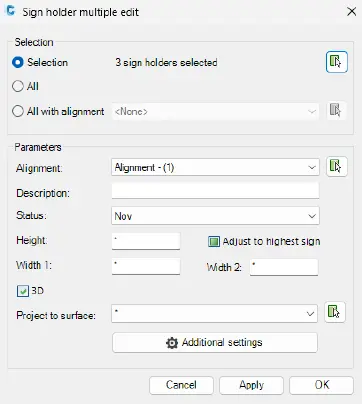
- Select Sign Holders in the drawing which you want to edit:
Selection – with the button
 select Sign Holders in the drawing.
All – all Sign Holders in the drawing are selected.
All with alignment – Sign Holders assigned to selected Alignment are selected.
- By Parameters, you can select specific parameters you want to edit.
Alignment – if you want to assign selected Sigh Holders to specific alignment, select it from drop-down list or select it in the drawing with the button
.Description – define description of selected Sign Holders.
Status – define status of selected Sign Holders from drop-down list.
Height - define height of selected Sign Holders.
Adjust to highest sign – select this option to adjust elevation of selected Sign Holders to the top elevation of the highest Sign.
Width 1 - specify the width between two columns of the selected Sign Holders.
Width 2 - specify the width between second and third column of the selected Sign Holders.
3D - create 3D model of selected Sign Holders.
Project to Surface – select the appropriate TIN surface from the drawing
or from the drop-down list  to project the 3D model.
Press »Additional Setting« button to edit additional Sign Holder parameters.
Define the Sign Holder Construction from the drop-down list for selected Sign Holders. You can choose between pre-defined Construction types.
Define the geometry parameters for the selected Construction type:
Height,
Bulge,
Width 1,
Width 2.
- Define the settings for the Top view, Section view and 3D view of the selected Sign Holders, as described in chapter Insert Sign Holder.