
# Create Offset Alignments
Command Description
The "Create Offset Alignments" command creates multiple offset alignments according to selected offset alignment preset. Presets can be modified and saved for use in other projects.
To create multiple offset alignments
Click Kobi Toolkit for Civil 3D tab > Alignments panel > Create Offset Alignments


Select alignments that will be used as a base for offset alignments.
Select preset from the preset drop down.
Optionally modify preset of left and right alignment side by:
a. Double clicking row -- enter edit mode for double clicked row
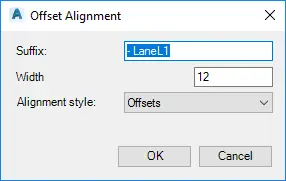
Enter Suffix, Width and Alignment style.
b. Insert new row by clicking
 and entering data.
c. Delete selected row by clicking

d. Move row up or down by clicking


Click OK.
To add new preset
Click Kobi Toolkit for Civil 3D tab > Alignments panel > Create Offset Alignments
Modify the offsets for left and right alignment side to get desired configuration.
Click
 and enter new preset name.
Click OK.
To remove preset
Click Kobi Toolkit for Civil 3D tab > Alignments panel > Create Offset Alignments
Select preset that you would like to remove from drop down.
Click
 to delete the preset.
Click OK.