
# Assembly report
Command Description
The "Assembly report" command allows you to create report of assemblies for each corridor region.
To create report of the assemblies
Click Kobi Toolkit for Civil 3D tab > Corridors panel > Assembly report

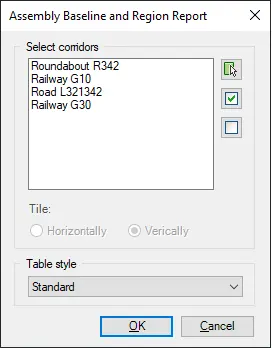
Select one or more corridors by selecting it from the list or by picking it from the drawing. You can also click on the
 button to select all available
corridors or use
button to select all available
corridors or use
 button to unselect all corridors.
If you select more than one corridor, you have option to tile the reports horizontally or vertically.
From "Table style" drop down select a type of table to be used.