
# Pipe Elevation
Command Description
The "Pipe Elevation" command is intended to calculate elevation of selected point on pipe. There is also option to insert Structure or COGO point at that point.
To calculate the elevation of selected point on pipe
Click Kobi Toolkit for Civil 3D tab > Pipes panel > Pipe Elevation

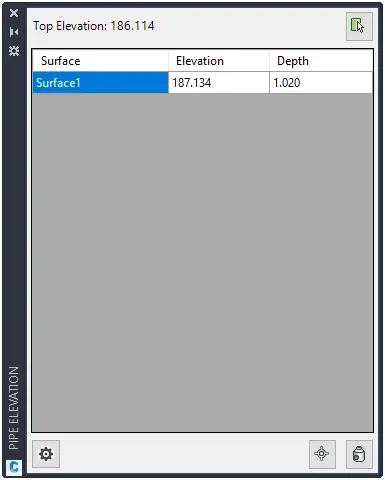
Use picker
 to select point on pipe. Please note
that pipe can be selected in layout or profile view.
to select point on pipe. Please note
that pipe can be selected in layout or profile view.Click
 button to insert COGO point at
selected point on pipe.
button to insert COGO point at
selected point on pipe.Click
 button
to insert Structure at selected point on pipe.
button
to insert Structure at selected point on pipe.

In the "Add Structure" dialog select structure from the dropdown list and define Sump value.
- Click settings
 button to specify reference point
for pipe elevation and reference point for depth calculation (Top,
Crown, Centerline, Invert, or Bottom).
button to specify reference point
for pipe elevation and reference point for depth calculation (Top,
Crown, Centerline, Invert, or Bottom).